



- Home
- service
- Study and research support
- PCs and software
- Customized PC
Customized PC
Please obtain the customization configuration or quotation from each manufacturer's university co-op page and bring it to the co-op store or contact us by email. Depending on the manufacturer, delivery may be significantly delayed from the estimated delivery date displayed. Please note that we cannot accept cancellations, changes, or returns after an order has been placed at the store. Please contact each store for details
University Co-op Customized PC Portal
University Co-op Customized PC Portal
This is a customized PC portal site exclusive to the University Co-op
Participating manufacturers
DELL, hp Direct Plus, Panasonic, VAIO BUSINESS, Fujitsu, NECDirect, EPSON Direct, mouse, Dynabook, Lenovo, uniV, third wave
Fujitsu
Fujitsu Estimate Support System Co-op page
Please access the customized PC portal site exclusive to the University Co-op
The Fujitsu products that can be customized at the Co-op are limited to those listed on the above website
DELL
University Co-op Dell Premier Page
Customize your PC on the Co-op's dedicated page, enter your order information, then print out the estimate and bring it to a Co-op store, or apply by email
To use this service, you will need to register as a new user (name/email address).
Please contact your local Co-op store for user registration.
Please refer to this page for contact information for each store.
Dynabook
Dynabook University Co-op page
Customize your PC on the Co-op's dedicated page, enter your order information, then print out the estimate and bring it to a Co-op store, or apply by email
hp Direct Plus
Please proceed to the manufacturer's page via the link above. (If you do not go through the link above, you may not be able to access the university co-op page.)
Customize your PC on the Co-op's dedicated page, then print out either the configuration selection screen, cart screen, or quotation and bring it to a Co-op store, or apply by email
*Shipping charges apply to all items
Panasonic
MyLet's Club University Co-op website
Please select a model from the website above and proceed to "Issue an order form." Download the PDF of the issued order form, print it out, and bring it to a Co-op store, or apply by email
The content that can be customized on the University Co-op website is limited.
Also, products customized through the regular MyLet's Club cannot be purchased on the website.
Please check the latest shipping information for delivery times
VAIO BUSINESS
Customize your PC from the corporate PC page, print out the quote and bring it to a Co-op store, or apply by email
Please note that the VAIO products that can be customized at the Co-op are limited to those listed on the corporate PC site.
Please note that we cannot handle products on the personal page.
NEC Direct
Customize your PC on the Co-op's dedicated page, then print out either the configuration selection screen or the quotation and bring it to a Co-op store, or apply by email
EPSON Direct
Customize your PC on the Co-op's dedicated page, then print out either the configuration selection screen, cart screen, or quotation and bring it to a Co-op store, or apply by email
*If delivery is to a location with a different address (house number) from the Co-op store, additional shipping charges may apply
Apple
Customization (main unit only*) is available at an educational price
iPads the Co-op's ordering system . The Co-op only sells Wi-Fi models, and does not offer additional engraving services.
If you order directly from the website above, the Co-op will not be able to create billing documents.
Please print out the configuration screen and visit the store, or request it by email.
*Please note that some customizations may not be applicable in some cases
(such as pre-installation of Microsoft Office or automatic AppleCare registration)
*How to order a customized Mac
After adding the desired products to your bag, please save the bag screen with the product details displayed as a PDF or image file and send it as an email attachment to the store where you applied, or print it out and visit the store
https://www.apple.com/jp/shop/education-pricing
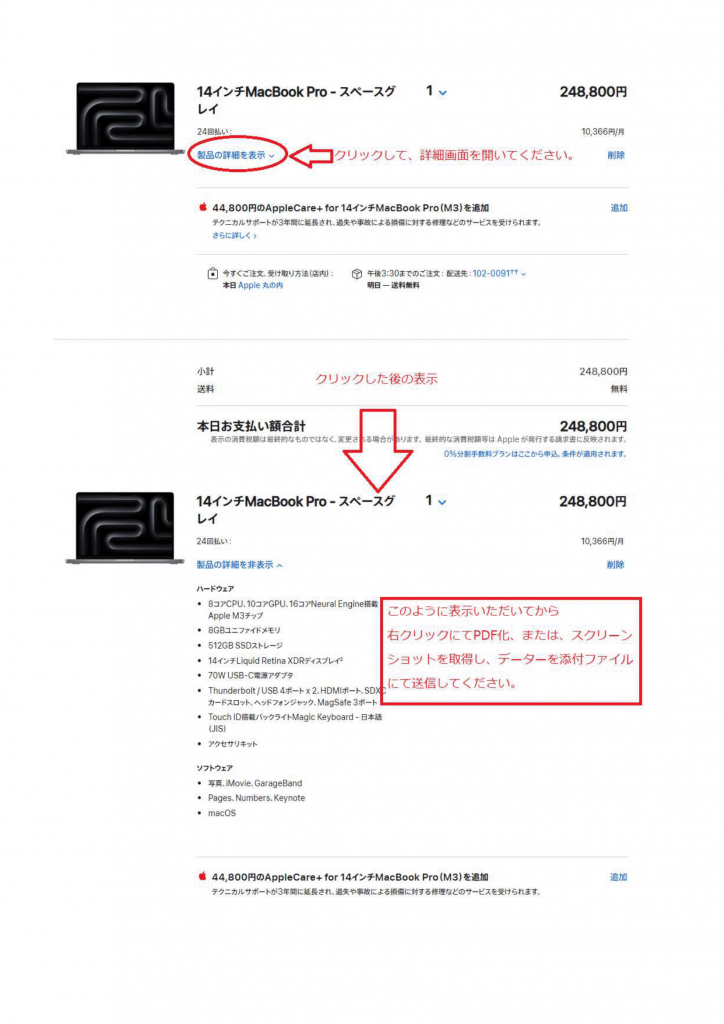
Please send the attached file to each store by email
*Please make sure that the product name, product details (specs such as memory capacity and keyboard layout), and academic price are all listed on the bag screen.
*Please make sure that AppleCare+, additional software other than the standard installation, and accessories such as a mouse or keyboard other than those included as standard are not included.
AppleCare+ and accessories can be ordered separately, so please let us know the products you would like in the body of your email.
If you have any other questions, please feel free to ask.
Thank you very much for your cooperation
University Co-op's original custom-made computer "uniV"
Custom-made PC for universities and laboratories: uniV
Supports OS-less and Linux!
How to use (please proceed to order)
- Access the above link
- After customizing your desired model, click "Order Information."
(Enter your customer information and select the store on each campus.) - On the final confirmation screen, click "Order with this content."
After ordering
The manufacturer or store will contact you to confirm.
We will contact you when the product arrives at the store.
When we contact you, please let us know if you have any delivery preferences.
Lenovo Japan official page
Customize your PC on the shopping page, then print out either the configuration selection screen or the cart screen and bring it to a Co-op store, or apply by email
- For some products, a handling fee will be charged in addition to the price displayed online (from May 8, 2023). Please be sure to request a quote from a Co-op store before ordering.
[Products subject to handling fee] idea / Yoga / ThinkBook
[Handling fee amount] 5% of the price displayed online, including tax
(Calculation example: If the price displayed online, including tax, is 100,000 yen, the Co-op sales price = 100,000 x 1.05 = 105,000 yen) - The online e-coupon is only applicable to certain products.
[Coupon applicable products]
Please note that the ThinkPad / ThinkCentre / ThinkStation coupons are only applicable to the above corporate products.
*Some coupons, such as night coupons and weekend-only coupons, are not applicable. - The deadline for accepting orders for campaign eligible models is 12:00 on the closing date.
Please place your order by 12:00. - For Lenovo products, the delivery time listed on the website may differ significantly from the actual delivery time. If you are in a hurry, please use another manufacturer
- Genuine Lenovo peripherals and accessories are shipped from overseas, so delivery takes approximately 2-4 weeks
Mouse Computer
Customize your PC on the Co-op website and proceed to "Print quote." The "Order Form" will also be printed automatically, so please bring both to the store. You can also attach them to an email
The delivery time is as stated in the quotation above
Third Wave
Third Wave Co-op dedicated page
Customize your PC at "Dospara" or "Dospara Plus", then print out either the configuration selection screen, cart screen, or quotation and bring it to a Co-op store, or apply by email
The delivery time is as stated in the quotation above
