


Hongo (Yayoi Asano)
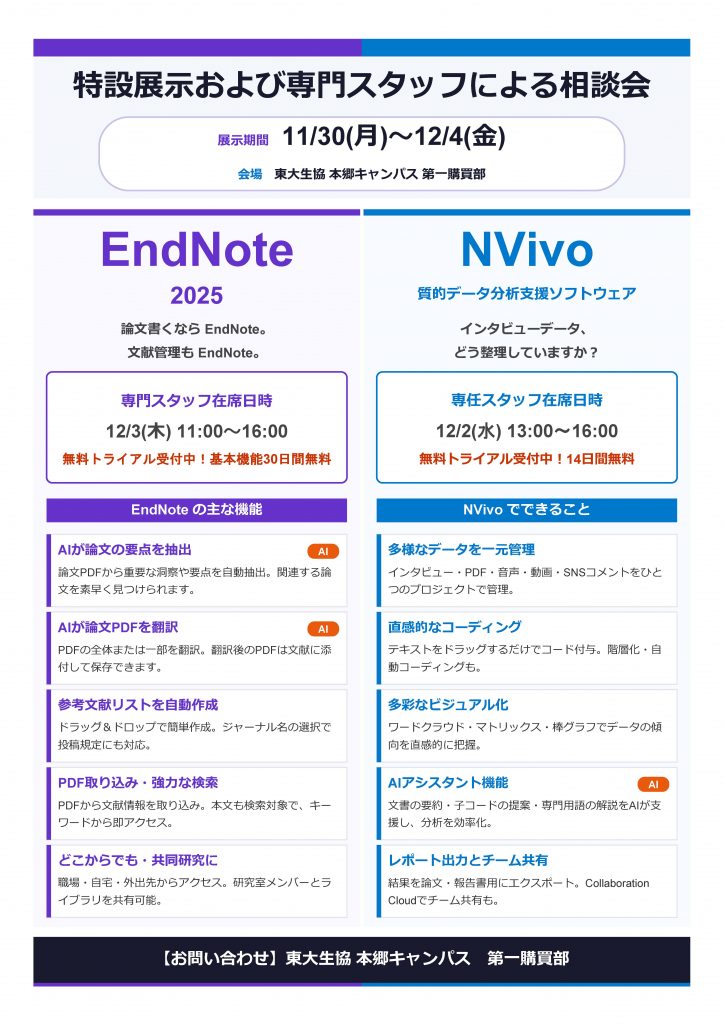
Hongo First Purchasing Department EndNote 2025 / NVivo Special Exhibition & Consultation Session November 30th (Mon) - December 4th (Fri)
We're holding a special exhibition and consultation event for EndNote 2025 / NVivo!
Exhibition Period: Monday, November 30th - Friday, December 4th
Specialist Staff Available (Individual Consultation Session): Thursday, December 3rd, 11:00 AM - 4:00 PM
Venue: Entrance to the First Bookstore, Hongo Campus, University of Tokyo
EndNote
[Main Contents]
01) Demo Exhibition:
You can experience
the actual operation and new features of the latest version of EndNote 2025.
02) Individual Consultation
, from basic usage
to how to use the new AI features and PDF management techniques.
03) Introduction and Purchase Consultation:
We also accept consultations
regarding student versions and bulk purchase methods
[EndNote's Basic Functions]
[Collection and Management of Literature]
- Import PDF files
Easily import literature information from academic literature databases and full-text PDFs.
- Powerful search function
The text of imported PDFs is also searchable.
You can search for the literature you want by simply entering keywords.
[Data synchronization and sharing]
Access
from anywhere Access
- Ideal for collaborative research
Share your library with other users in collaborative research or within your research lab.
[Paper writing support and citation]
- Automatic creation of reference lists
Easily create reference lists by dragging and dropping.
- Change to format according to submission guidelines
Simply select the journal name to change the format according to the submission guidelines.
[New Features in EndNote 2025]
AI automatically extracts key points from research paper PDFs. Furthermore,
the AI can translate the entirety or parts of the research paper PDF, and the translated PDF can be attached to the reference and saved.
NVivo
[Main Contents]
01) NVivo Demo Experience:
You can actually operate the software and check
the coding and visualization functions
02) Individual Consultation Session with Dedicated Staff:
a wide range of questions, from how to use it for research to advice on implementation and purchase
.
What you can do with NVivo:
[Data Collection & Management]
- Centralized management of diverse data formats:
Manage
all kinds of data in one project, including interviews, PDFs, audio, video, and social media comments
- Powerful search function:
The text of imported PDFs is also searchable.
Access the data you want with a single keyword.
[Coding & Analysis]
- Intuitive coding:
Assign code simply by dragging and dropping text.
Supports hierarchical structures and automated coding.
- AI assistant function:
AI assists with document summarization, subcode suggestion, and explanation of technical terms,
streamlining analysis work.
[Visualization, Output & Sharing]
- Diverse visualizations
: Intuitively grasp data trends
in various formats such as word clouds, matrices, and bar graphs
- Report output and team sharing:
Export coding results for papers and reports.
Team sharing is also possible with Collaboration Cloud.
Free trial available
! Try it for free for 14 days.
Includes a Japanese user guide!
EndNote 2025 / NVivo Special Exhibition and Consultation Event← Click to go to the blog
